AI checker text coverage, language and local processing
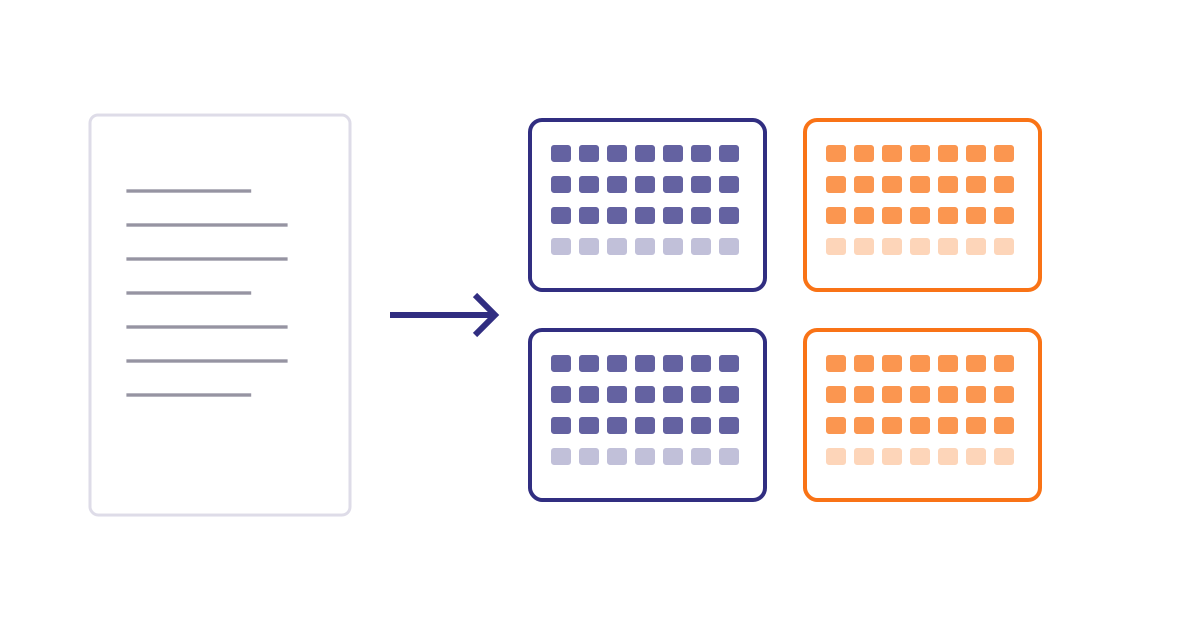
A long draft can produce a convincing-looking AI checker result even when a tool silently examines only its beginning. I want the report to say which text was processed before I ask what its score means. Here, the original content-token sequence is covered completely within a clear operating limit.
Choose Check text for an immediate style result over the full accepted draft. Choose Deep check with AI model for token-window scores after a public download of about 126 MB of weights plus runtime files. Only the second mode has a token limit; neither mode sends your draft to a remote inference service.
Count words, bytes and tokens separately
The word count is a local reading aid based on sequences of letters and numbers, including ordinary apostrophes. Where the browser supports it, Chinese, Japanese and Thai text uses word segmentation rather than relying on spaces. The byte count measures the UTF-8 encoding of the actual draft. The token count comes from the model’s tokenizer. These numbers describe different things, so a draft of 500 words is not guaranteed to contain 500 tokens or 500 bytes.
An ASCII letter occupies one UTF-8 byte, an accented “é” occupies two and an emoji such as “😀” occupies four. A token can represent a word, part of a word or another piece of the input. Names, specialized terms and punctuation can change token density. The browser checks the byte and minimum-word limits before downloading, but the final token limit requires the tokenizer to be loaded.
Know the exact acceptance limits
Both modes require at least 80 words and allow at most 20,000 UTF-8 bytes. The quick check analyzes the full accepted text. The optional deep check tokenizes the whole draft without truncation and accepts at most 2,040 content tokens. Language is estimated automatically. Text in another language still gets a result. When English is not clearly recognized, a warning explains the English vocabulary rules and the model’s English training. Translated controls do not add multilingual model training.
If a word or byte limit is exceeded, the draft remains in the editor and no score is produced. If only the deep token limit is exceeded, the quick result remains available and no partial model score is produced. Shorten the passage at a sensible paragraph boundary and decide whether the smaller selection still represents what you want to examine. Label that selection honestly when keeping a report. A valid report for one excerpt should not be presented as a result for an entire book or document.
| Measurement | Purpose | Limit or example |
|---|---|---|
| Words | Minimum prose sample | At least 80 |
| UTF-8 bytes | Bound draft size before loading | At most 20,000 |
| Content tokens | Bound model input coverage | At most 2,040 |
| One content window | Independent inference | At most 510 tokens |
| Model input positions | Content plus boundaries | At most 512 |
Follow consecutive windows to the last token
The tokenizer produces the complete sequence of content-token identifiers. The worker takes consecutive pieces from that sequence without converting them back to text and tokenizing them again. That preserves the original token coverage. Each piece gets its model boundary tokens, which do not count toward the displayed content ranges. Windows do not overlap.
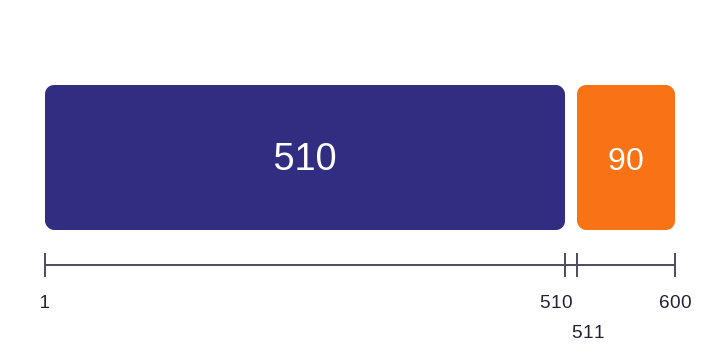
For the synthetic 600-token control case, the ranges are 1–510 and 511–600. Their lengths are 510 and 90, summing to 600. No accepted content token belongs to both ranges, and the final range ends at the original total. A report’s coverage count therefore has a direct meaning. It does not imply that a window understands context outside its own boundaries.
Distinguish model downloads from sending a draft
The checker downloads a fixed public runtime, tokenizer and quantized ONNX model. The weights alone are about 126 MB. These requests retrieve public files; they do not send your text to an inference endpoint. The browser worker holds the draft and runs the model locally using WebAssembly. No account, API key or WordPress text handler is involved.
External asset hosts still see ordinary request information, including the connection’s IP address. Browser-based computation is not the same as making no network requests. Read the download explanation before pressing Deep check with AI model, especially on a metered connection. There is no background model load when you type or choose an example. The first deep check can take longer than later model checks if the browser reuses cached public files. The main Check text action needs no model assets.
Cancel cleanly when the draft changes
Cancel terminates the model worker and retains the draft and current result. Clear removes the draft and results. Typing during a model check stops the old job and clears its score; a delayed reply cannot add a score to a different passage. Check text also stops a pending model job and returns a fresh quick estimate.
There is a three-minute deadline for loading and checking. An unavailable asset, blocked browser feature or insufficient memory produces an explicit failure rather than a fabricated zero score. The draft remains available. There are no hidden retries or automatic checks. Public assets already cached before cancellation may remain under the browser’s cache controls; clearing the editor does not promise to remove them.
Export results without storing the draft automatically
The report contains scores, token ranges, model identity, revision, runtime and limitations. It does not include the full draft. CSV keeps raw fractional scores for the windows and the token-weighted summary, while TXT is a readable version. Both are generated from the current completed result on your device. Copy uses the same current report, with a selectable fallback when clipboard access is refused.
There is no automatic recovery after you close or reload the tab. Copy your draft separately if you need to keep it; report export is not draft export. Your own downloaded files can persist wherever you save them. The interface does not claim that deleting a local editor field deletes files you previously downloaded or changes a browser’s cache policy.
Keep the model’s scope beside the result
A successful test that public weights load and local inference returns finite scores verifies execution. It does not establish detection accuracy on your genre, prove calibration or validate another language. This distinction is why the report identifies the quantized model and carries its warning. The browser pipeline documentation describes the underlying loading mechanism; the model card provides model-specific context.
Try the AI checker with a suitable English selection, then read the score interpretation guide before drawing conclusions. Complete coverage answers which tokens were examined. It does not answer who wrote them, and that boundary remains essential even when a tool processes every accepted token correctly.
Common questions
Are word count and token count equal?
No. The tokenizer can split words and punctuation into several pieces.
Is over-limit text silently cut?
No. The whole draft is rejected, remains in the editor and receives no partial score.
Does Cancel delete cached model files?
No. It stops the current worker; browser-cached public assets may remain.